
ShareSet is preparing to launch

Organise outsourced work, from send-out to send-back.

ShareSet helps businesses share files, manage outsourced work, and receive returned work back from contractors, subcontractors and freelancers — all in one organised workspace.

Why ShareSet

Running outsourced work through multiple emails over time can get messy.

Files get lost and forgotten. Job details end up spread across inboxes, messages and shared drives. ShareSet keeps your work, projects and files together and organised.

Jobs, not folders

Create & Receive Jobs

Unlike usual file storage and sharing services where you upload and organise files in folders, ShareSet organises work into Jobs. You can create a Job to outsource work, or be invited into a Job by a client to work on.

When you create a Job

You send work out

The files you upload are called Source Files. These are the files other people work from.

When a Job is shared with you

You send work back

The completed work files you upload appear separately as Returned Files.
File Sets

Where the action is

Each Job contains one or more File Sets. Sets are where files are uploaded to and accessed from.

If someone doesn't use ShareSet, you can email them a link to a File Set from any Job you own. They'll use the emailed link to access your Source Files and upload their Returned Files.

Source Files Returned Files Email access links
ShareSet file sets showing source files and returned files

Client-shared work

If your client shares a Job with you...

01

Return work directly

For straightforward jobs you complete yourself.

  1. Download work from their Source Files in the latest File Set.
  2. Return your completed work to that same File Set.
02

Outsource privately

For work you need to pass to a subcontractor or freelancer.

  1. Link the Source Files from your client's File Set to a new Job you own.
  2. Invite your third party to work from those linked files within your own Job.
  3. Review the files they return to your File Set.
  4. Pass those files back to your client's original File Set with the click of a button.
Your client and your third party never see or know of each other throughout the process.

Privacy & control

Share the job without giving away more control than you need to.

ShareSet lets each job owner decide what another organisation can view, change, upload or delete inside a shared job.

  • Set default permissions that apply to all organisations when they connect with you
  • Adjust custom permissions per organisation if you trust some more than others
  • Adjust permissions on a job-by-job basis per organisation without affecting their permissions in other jobs.
ShareSet permissions modal showing job summary, messaging and file permission controls
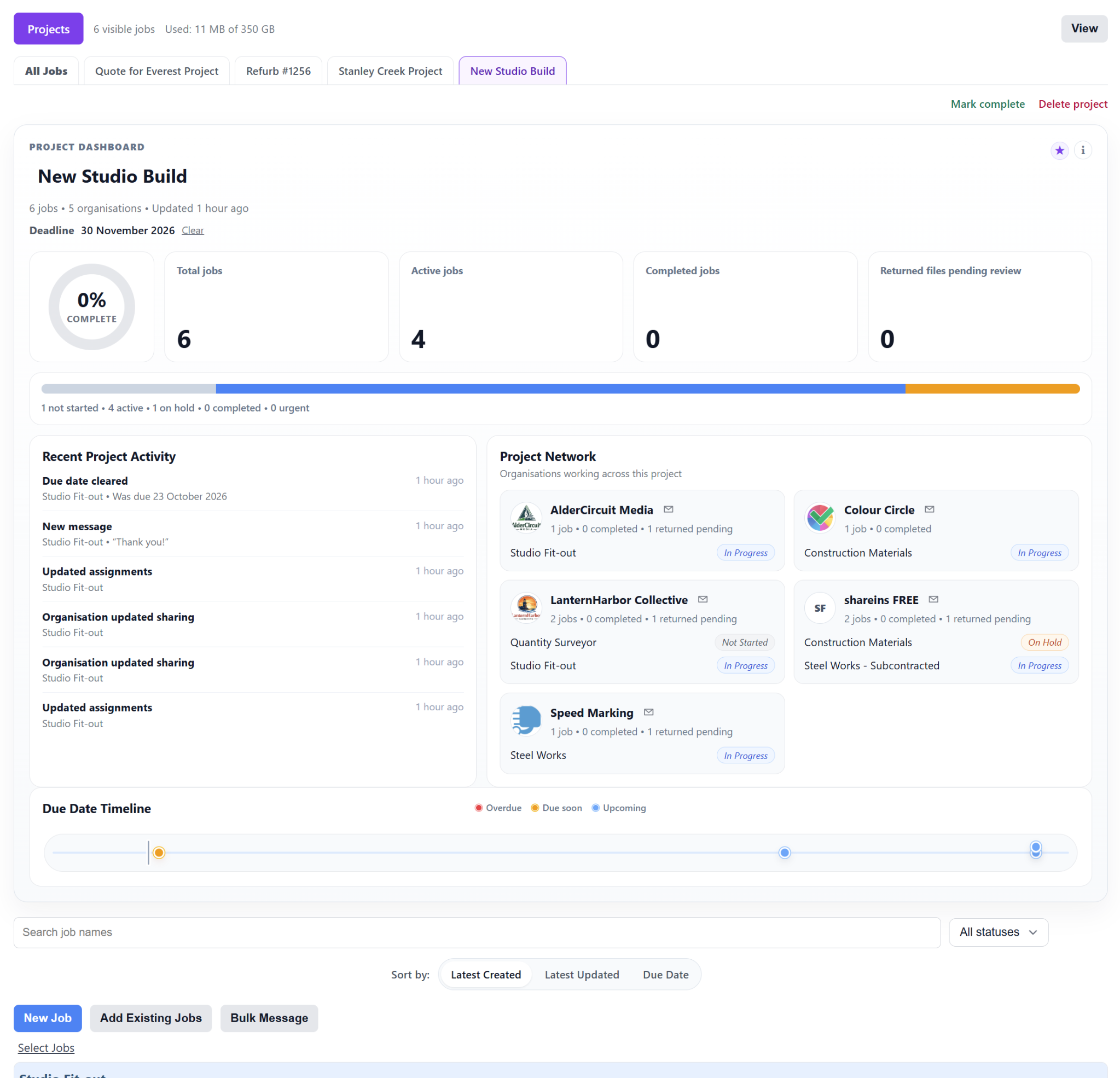
ShareSet Pro project dashboard showing multiple jobs grouped into one project

Projects for Pro teams

Bring multiple related jobs together in one project.

When outsourced work grows beyond a single job, ShareSet Projects help Pro plan teams keep connected jobs, organisations, deadlines and project activity together in one organised view.

  • Group multiple related jobs into one project dashboard
  • Track progress, deadlines, project activity and connected organisations
  • Keep larger outsourced workflows organised without changing how individual jobs work

Plans

Start small and grow as your work grows.

Paid plan booster packs allow you to scale your storage as you grow.

ShareSet is preparing to launch.

Have a question about ShareSet or its plans? Send us a message and we will be in touch.

Contact ShareSet